Architecture
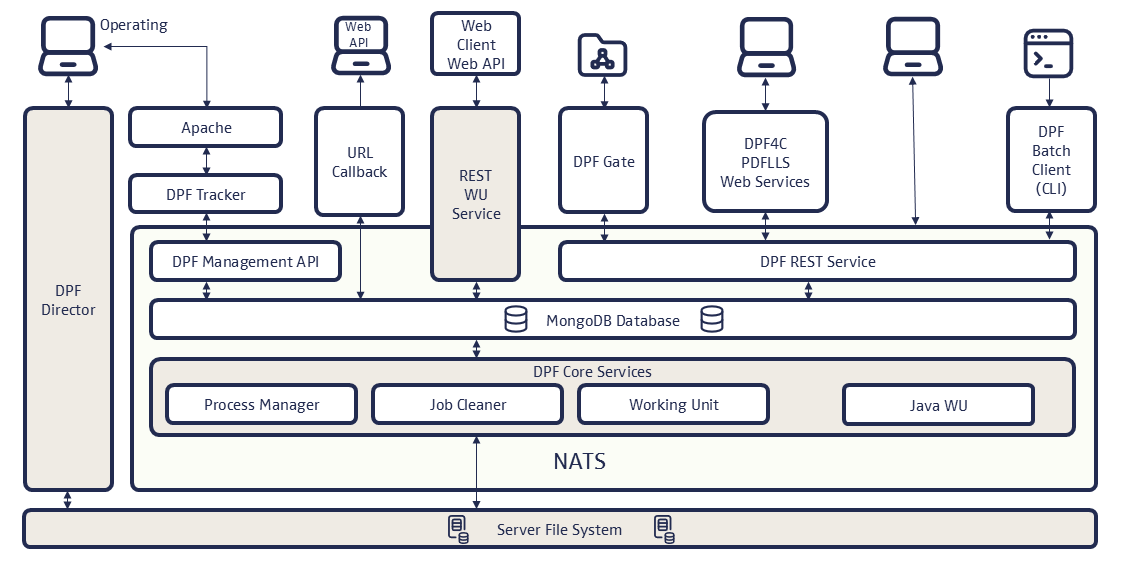
DPF Server Components
The DPF server includes the following components:
-
DPF Server
The main application of DPF consists of several microservices such as
seal-dpf-jobclient-apiorseal-dpf-process-manager. -
In on-premise installations, the Consul configuration service is used for discovering services via Domain Name System (DNS) and managing the distributed configuration in a cluster. In a cloud environment, the container orchestration system is used for this.
-
MongoDB
The SEAL-specific MongoDB database contains the data about the processes, working units and jobs. Workflow and working unit configurations can also be stored in MongoDB instead of the file system. This is the default in SaaS installations. The services then load them without a restart. For how to install and configure MongoDB, refer to the SEAL-specific MongoDB documentation.
-
SEAL NATS
For a better message handling, NATS has been introduced as message broker as of DPF 4.0.0. For this, a SEAL Systems-specific SEAL NATS package is available. DPF uses NATS to start working units, report job status, and broadcast administrative actions such as configuration updates and job cleanup. For example, canceling or repeating a job through DPF Tracker reports its status the same way. DPF Batch Client does not trigger these NATS messages; it only calls
seal-dpf-jobclient-apito start jobs. For more information about SEAL NATS and how DPF uses it, refer to the SEAL NATS documentation. -
Elastic Stack (optional)
The DPF log, statistics, audit and accounting data is administrated and visualized by means of Elastic Stack (Elasticsearch and Kibana). The installation is optional. Elasticsearch is the database containing the data. Kibana is the user interface for visualizing the data.
Hint - separate installation
For how to install and configure SEAL Elastic Stack, refer to the SEAL Elastic Stack documentation.
-
SEAL Logrotate (optional)
SEAL Logrotate cleans up outdated log files of the DPF services to free up storage space and prevent performance and memory issues. You can run Digital Process Factory without Logrotate, but we strongly recommend to install it. When running a cluster, install it on each server. For more information, refer to the SEAL Logrotate documentation.
DPF Batch Client Components
The client components of a DPF system include:
-
DPF Admin Client
As of DPF 4.0.0, DPF Admin Client is being replaced by DPF CLI.
-
Using the command line client, DPF CLI, you administrate the services and configuration of Digital Process Factory or delete jobs from the database. DPF CLI replaces the former DPF Admin Client.
-
Using the command line program, DPF Batch Client, you pass jobs interactively or from another system, for example an SAP system, to the DPF system.
-
For assigning a job asynchronously, you use DPF Gate. It regularly scans the configured directory for new files and passes them to the DPF system as new jobs. DPF Gate is not available for DPF 4.0.0.
-
DPF Java Batch Client
As of DPF 4.0.0, there is no Java Batch Client anymore.
-
Using the graphical user interface, DPF Tracker, you track, repeat and delete jobs in the DPF system and cancel jobs.
Job Processing
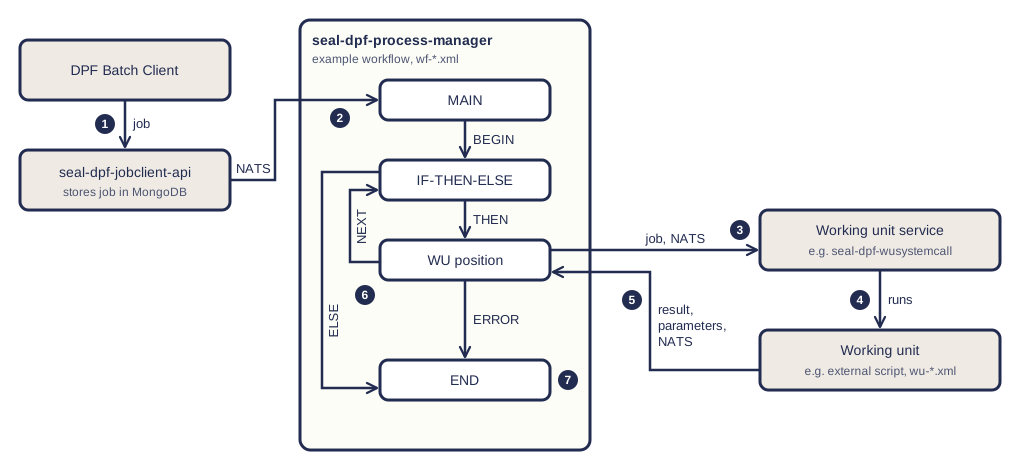
A job runs through a workflow. The workflow calls working units in a defined order. Workflows and working units work together as follows:
- DPF Batch Client sends the job with the name of a workflow, its parameters, and its files to
seal-dpf-jobclient-api. The service stores the job in MongoDB and reports it toseal-dpf-process-managervia NATS. seal-dpf-process-managerstarts the workflow at itsMAINposition.- At a position that calls a working unit,
seal-dpf-process-managerpasses the job via NATS to the service that manages this working unit type. - This service runs the working unit, for example an external script. The working unit can change job parameters.
- The service reports the result via NATS.
seal-dpf-process-managercontinues the workflow at the next position. If the working unit failed, it continues at the error position. - The following positions use the current job parameters, for example in conditions.
- The job ends when the workflow reaches its end.
A workflow can run through positions several times. In the example below, the working unit position leads back to the condition until the condition is false.
For the structure of the files, refer to Workflow File and Working Unit File.