Requirements
Server Requirements
User and Privileges
-
For installing Digital Process Factory, administrator privileges are required.
-
If you want to manage DPF services via DPF CLI, privileges for executing PowerShell scripts are required. With the installation, the privileges are also required but can be specified explicitly than. The execution policy has to be set to
RemoteSignedat least. For more information about execution policies, refer to the Microsoft documentation. For setting the execution policy, open a PowerShell (Administrator) and execute the following command:Set-ExecutionPolicy -ExecutionPolicy RemoteSignedHint - impermanent
The execution policy might be overwritten by a group policy.
No DNS Server
No DNS server is active on the server.
Hint - Consul DNS
In an on-premise installation, the configuration of Digital Output Factory is kept in a Consul key value store. In a cloud environment, the container orchestration system is used for this. Consul provides its own DNS server.
Deactivate DNS
To deactivate an existing DNS server use the following command in a PowerShell (Administrator):
Uninstall-WindowsFeature -Name DNS
Java
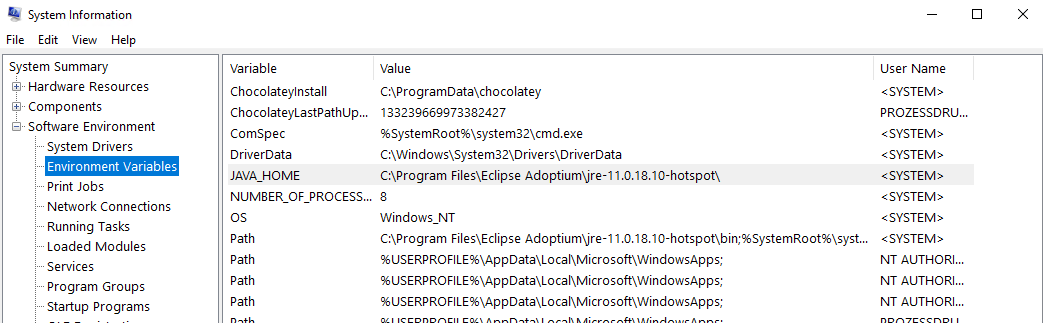
A Java Runtime Environment equal or higher than Java version 21 is installed on the server. The JAVA_HOME environment variable is set accordingly.
Hint - Java installation
For detailed instructions on how to install Java and set the required environment variables, refer to SEAL Online Service.
Re-log in your current user after the installation and check if the path is set correctly in the System Information.
Frozen Master Convert
Download and install Frozen Master Convert 2026-1 while keeping the defaults.
If you install Frozen Master Complete instead of Frozen Master Convert, select DPF in the component selection.
MongoDB
Install the SEAL-specific MongoDB before installing Digital Process Factory. We recommend MongoDB 8.0.4 or higher. Configure a replica set and initialize the database. For more information refer to Configuring SEAL MongoDB.
Hint - cluster installation
In a cluster installation, install and configure MongoDB as a cluster before installing Digital Process Factory.
SEAL NATS
The SEAL NATS message broker as of version 2.9.2 has to be installed on the DPF server before installing Digital Process Factory. For more information about the SEAL NATS installation, refer to the SEAL NATS documentation.
SEAL Logrotate (Optional)
SEAL Logrotate cleans up outdated log files of the DPF services to free up storage space and prevent performance and memory issues. You can run Digital Process Factory without Logrotate, but we strongly recommend to install it. When running a cluster, install it on each server. For more information, refer to the SEAL Logrotate documentation.
Elastic Stack (Optional)
The DPF log, statistics, audit and accounting data is administrated and visualized by means of Elastic Stack (Elasticsearch and Kibana). The installation is optional. For more information, refer to SEAL Elastic Stack documentation.
As of DPF 4.3.0, Elastic Stack 7 is no longer supported. The configuration files for Filebeat, Kibana and Elasticsearch ship with Digital Process Factory. For more information, refer to Configure SEAL Elastic Stack.
Next Step
Continue with: Installation